

Your tracker closes on Friday. There are 4,000 verbatims waiting, the codebook needs two new codes before anyone can start, and the client wants topline results by Tuesday.
If that sounds familiar, the problem usually isn’t your coders. It’s how much of the work still depends on them working through responses one at a time.
Ascribe has helped a lot of research teams manage that work. But open-ended survey coding has changed quickly, and many teams now want AI to handle the first pass, researchers to stay in control of the result, and the coded data to flow straight into analysis, some or all of which certain alternatives now do better.
Below, we compare six Ascribe alternatives on the features that matter most for survey research, so you can find the right fit for your team.
What Ascribe does well

Ascribe is one of the longest-standing verbatim coding tools in market research. Its core product, Ascribe Coder, was built around the way coding departments have traditionally worked: codebooks, coder assignments, and managers who track progress and quality across a team.
It has added AI over time. Theme Extractor can generate a codebook with nets and codes from your responses, AI Coder can save codebooks for future studies, and Ask Ascribe answers plain-language questions about your data. Coding Assistant and Lightning Mode suggest codes based on work your team has already done, and results export to SPSS.
For agencies with a dedicated coding team and established processes, that’s a decent setup. So what has changed and why are teams now looking for alternatives?
Ascribe’s limitations: Why teams look for alternatives
Below are some of the most common reasons we’ve seen given that teams find Ascribe to be lacking for modern open-ended survey coding:
The workflow is still built around manual coding
Ascribe’s AI features sit on top of a coder-first workflow. That suits teams with full-time coders, but smaller insights teams often want AI to code the whole dataset first and spend their time reviewing it. A tool designed that way from the start can feel much faster day to day.
Large codebooks can get hard to manage
One market research reviewer on G2 put it simply: “Depending on size of code frame, the organisation can sometimes become difficult.” When a tracker has hundreds of codes and nets, keeping them organized and applied consistently takes real effort.
Analysis happens somewhere else
Crosstabs, co-occurrence, and trend reports are part of Ascribe’s separate CX Inspector product. For many teams, the coded file still goes into Q, SPSS, or another tool before anyone can compare themes by segment. Every handoff adds time, and another place for errors to creep in.
8 Things to look for in an Ascribe alternative
Here are the criteria we used to compare each platform. Not every project needs all of them, but the more of your workflow a tool covers, the fewer handoffs your team has to manage.
1. AI-generated and existing code frames
You should be able to let AI build a code frame from scratch or upload your own codebook. Trackers and client-supplied code frames depend on the second option, because changing codes between waves breaks comparability.
2. Single-code and multi-code attribution
A response like “Good value, but delivery took forever” belongs in two codes. Make sure the platform can assign several codes to one response, and switch to single-code attribution when a question calls for it.
3. Thematic and entity coding
“Why did you choose this brand?” needs thematic coding. “Which brands come to mind?” needs entity coding, which extracts and standardizes names, including misspellings and nicknames. Many tools only handle the first.
4. Human-in-the-loop review
AI coding is a first draft. Researchers need to review assignments response by response, merge, split, and rename codes, and move responses between codes without starting over.
5. Exports that fit your workflow
Look for exports that match what your team already uses, such as Excel, SPSS, or Q, and that drop in without manual cleanup.
6. Multilingual coding
Multi-market studies need one code frame applied consistently across every language, so the same idea lands in the same code whether it was written in German or Japanese.
7. Crosstabs and significance testing
Codes become far more useful when you can treat them as variables. Check whether you can cut codes by segment and run significance tests in the same platform, or whether you’ll need to export first.
8. Flexible AI exploration
A list of codes answers the questions you planned. The ability to chat with your responses helps with the ones you didn’t, such as why younger respondents keep mentioning price.
Ascribe alternatives compared
Before we dive into the details, here’s a 10,000-foot overview of both what each platform is best at as well as a feature breakdown comparison that includes Ascribe:
First, each platform’s strengths:
| Platform | Best for |
|---|---|
| BTInsights | Coding, review, crosstabs, and AI analysis in one place |
| Codeit | A traditional coding workflow with AI help |
| Displayr | Cross-tabulation and reporting |
| Caplena | Continuous feedback programs |
| Qualtrics Text iQ | Teams already running surveys in Qualtrics |
| Thematic | Exploratory theme discovery |
Next, a quick feature breakdown of Ascribe and its major alternatives:
| Platform | AI + own code frames | Multi-code | Entity coding | Human review | Multilingual | Crosstabs + sig testing | AI chat exploration |
|---|---|---|---|---|---|---|---|
| BTInsights | Yes | Yes | Yes | Yes | Yes | Yes | Yes |
| Codeit | Yes | Yes | Yes | Yes | Yes | Partial | Partial |
| Ascribe | Yes | Yes | Partial | Yes | Yes | Partial | Partial |
| Displayr | Yes | Yes | Partial | Partial | Yes | Yes | Partial |
| Caplena | Partial | Yes | Partial | Yes | Yes | Partial | Yes |
| Qualtrics Text iQ | Yes | Yes | Partial | Yes | Yes | Partial | Partial |
| Thematic | Partial | Yes | Partial | Yes | Yes | Partial | Yes |
“Partial” means the feature is limited.
6 Best Ascribe alternatives for open-ended survey coding
Let’s zoom in now and take a look at each alternative and find out more about what makes each stand out.
Each alternative listed below was chosen either because it excels in one area that Ascribe is weaker in, or it’s generally a stronger all-around option for open-ended survey coding:
1. BTInsights: Best overall Ascribe alternative for coding and analysis in one place
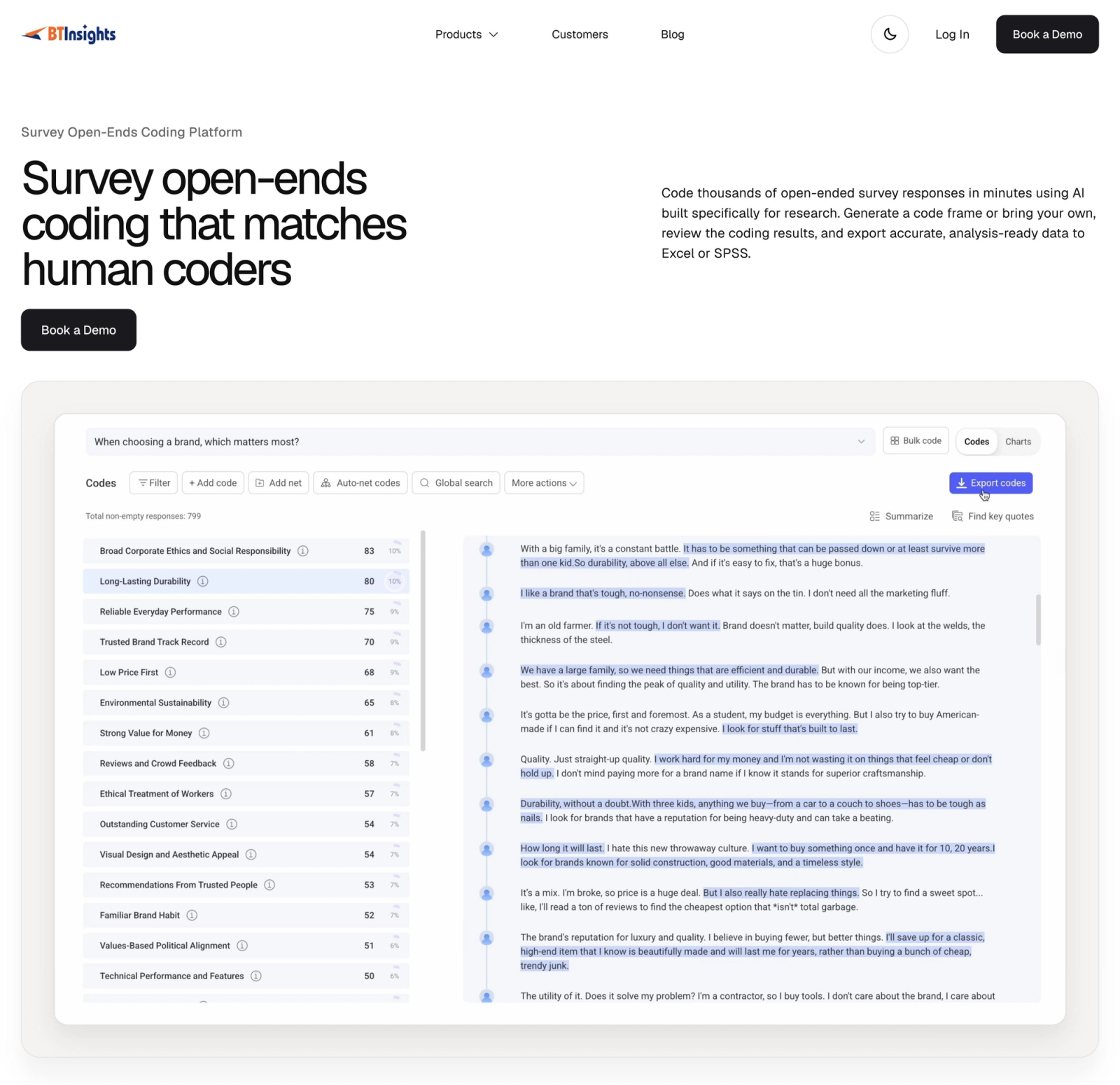
BTInsights is an AI-native platform built for market researchers who need to code open-ended responses, check the results, and analyze them by segment without moving between tools. Where Ascribe adds AI to a coder-first workflow, BTInsights starts with an AI first pass and gives researchers full control over the result.
- Code frames your way: Let AI build a code frame from your responses, or upload an existing codebook and have responses assigned to your predefined codes.
- Single-code, multi-code, and entity coding: Assign one code or several per response, and extract entities such as brands and places while recognizing different names for the same thing.
- Researcher control: Split, merge, rename, and group codes, move individual responses, and trace every code back to its source verbatims.
- Multilingual coding: Code and translate responses in more than 50 languages, including mixed-language datasets.
- Beyond coding: Turn codes into crosstabs, run significance testing, and ask follow-up questions of the responses in a chat interface.
- Research-friendly exports: Export to Excel, SPSS, and Q, or turn crosstabs into editable PowerPoint slides in your own template.
The platform fits into existing workflows, too. Abacus Data exports open-ends from Q, codes them in BTInsights, and brings the results back into Q. Work that once took about two weeks on larger studies now takes around 20 minutes. Analyst Veronica Postolski says, “It’s so easy to copy and paste the results back to Q, and we don’t have to spend extra time making sure everything’s aligned or putting in the codes manually.”
BTInsights is SOC 2 Type II audited, encrypts data in transit and at rest, and never uses customer data to train AI models.
Explore BTInsights Survey Open-Ends Coding.
2. Codeit: Best for teams that want a traditional coding workflow with AI help
Codeit is a dedicated verbatim coding platform from London-based Digital Taxonomy, and it’s probably the closest like-for-like swap for Ascribe. It’s built around the same codeframe-led workflow, with AI layered in to speed it up.
Its Extract feature builds a codeframe and autocodes responses, Refine lets researchers adjust the output, and machine learning applies your past coding to new data, which helps on recurring trackers. Brand Coding catches brand mentions however they’re spelled, and auto-translation covers more than 130 languages. Deep Dive lets you ask questions of your coded data and returns charts, summaries, and example verbatims.
Codeit’s Visualize feature produces charts and crosstabs, though significance testing isn’t documented. Pricing is volume-based with an annual commitment, and there’s a 30-day free trial. If your team wants a familiar coding environment rather than a full analysis platform, it’s a strong option.
3. Displayr: Best for teams whose priority is cross-tabulation and reporting
Displayr is a survey analysis and reporting platform best known for cross-tabulation, statistics, and dashboards. Its text categorization tools sit alongside those features, so coded open-ends can go straight into crosstabs with weighting and significance testing.
Displayr’s AI can identify themes and classify responses into one or several categories, and researchers can reuse existing code frames across variables. Custom AI prompts support tasks such as sentiment analysis and entity extraction. Results export to PowerPoint, Excel, and PDF.
The trade-off is depth on the coding side. Review and editing tools are more limited than in dedicated coding platforms, so Displayr suits teams whose main job is quantitative analysis and reporting, with open-ends as one part of it.
4. Caplena: Best for continuous feedback programs
Caplena is an AI feedback analysis platform used by CX teams and market research agencies. It builds a codebook quickly from your data, lets you merge and rename topics as you refine it, and analyzes text in more than 100 languages.
Data can come in from Excel, SPSS, or integrations with platforms such as Qualtrics and Medallia. Its Insight Agent answers questions about your feedback, and driver analysis shows which topics have the biggest impact on scores.
Caplena’s positioning has moved toward ongoing customer feedback, so teams running project-based studies should confirm that it supports their codebook import, export, and crosstab requirements before committing.
5. Qualtrics Text iQ: Best for teams already running surveys in Qualtrics
Text iQ is the text analysis module inside Qualtrics. Its biggest advantage is that open-text analysis happens next to the rest of your survey data, with no exports.
Researchers can create topics by tagging responses, building keyword queries, or, on Advanced licenses, accepting recommended topics. Topics can be nested, a response can carry several topics, and topic results can be analyzed against other variables in Stats iQ. Text iQ supports 14 languages, including English, Spanish, German, French, Japanese, and Simplified Chinese.
Keep in mind that much of the topic building relies on keyword logic, so nuanced coding can take more setup than in AI-native tools. Sentiment analysis and recommended topics require the Advanced license, and the Basic license caps each survey at 20,000 responses.
6. Thematic: Best for exploratory theme discovery
Thematic uses AI to discover themes directly from feedback, without a predefined taxonomy. Themes are organized in a hierarchy; each comment can carry several themes, and a theme editor lets you merge, rename, split, and create themes.
It also includes sentiment analysis, built-in translation, segment comparisons, and significance testing, plus an Answers feature for plain-language questions. That makes it a good fit for exploratory work and ongoing feedback analysis.
Having said that, starting from AI-discovered themes is a different approach from applying a client-supplied code frame. Teams running trackers or strict coding specs may need more control from the start.
How to switch from Ascribe without breaking your tracker
The riskiest part of changing coding tools is losing comparability across waves. A short, structured pilot avoids most of that risk.
- Export your current codebook, including nets and code descriptions, and load it into the new platform as a predefined code frame.
- Pick a recent wave your team has already coded and run it through the new tool using that same codebook.
- Compare results code by code, focusing on the codes that drive decisions and the responses where coders usually disagree.
- Time how long review and correction take, not only the first pass.
- Test the full output: exports into your existing tools, crosstabs by your key segments, and any client deliverables.
This is how the UNH Survey Center adopted BTInsights. The team uploads responses, applies the client’s existing list of codes, reviews the AI’s work, and brings the results back into Excel and SPSS. Project director Sean McKinley describes it this way: “It’s as if we had someone who was doing all of the work that we used to do ourselves.”
If accuracy is the main concern, it helps to see how coding models are benchmarked against human coders. Our comparison of two AI coding models on 2,617 human-coded responses walks through how that scoring works.
Code, Review, and Analyze Open-Ends in One Place
Ascribe made organized verbatim coding possible for a lot of research teams. But when AI only speeds up part of the job, the rest still lands on your analysts: managing the codebook, exporting files, and rebuilding tables somewhere else.
BTInsights was built to fix that with a more complete suite of AI tools for open-ended survey coding.
- Your codebook or AI’s: Start from scratch or apply an existing code frame, so tracker waves stay comparable.
- Researchers stay in control: Review every assignment, then merge, split, or rename codes in a few clicks.
- Analysis without exports: Run crosstabs and significance tests on your codes, then ask follow-up questions in plain language.
- Fits your existing tools: Export to Excel, SPSS, or Q, in more than 50 languages.
See how it works on your own data. Book a demo with BTInsights.