

Rather than having one designated spot for open-ended survey analysis, market research teams often find themselves relying on a number of applications to complete a single project. They might use one tool to code survey responses, another for cross-tabulation, a third for significance testing, and finally PowerPoint to recreate tables and charts.
Unsurprisingly, that fragmented workflow adds hours of manual work. It also makes it harder to move from raw verbatims to insights your stakeholders can act on.
Modern survey analysis tools can connect these steps. In turn, coding, cross-tabulation, significance testing, and reporting all sit in one workflow.
This guide walks through each step, shows why coding on its own only gets you partway, and explains how an integrated approach simplifies the whole process.
What Is Open-Ended Survey Analysis?
Open-ended survey analysis is the process of organizing, categorizing, and interpreting free-text responses collected through surveys.
Open-ended questions let respondents answer in their own words instead of picking from a list of predefined choices.
Here are a few examples of questions you’ll commonly see:
- Why did you choose this product?
- What would you improve about our service?
- What factors influenced your purchasing decision?
- Which brands come to mind when you think about this category?
- What is the main reason for your satisfaction score?
These responses are full of valuable qualitative detail. They tell you why people feel the way they do, often in language you'd never think to put in a closed-ended question.
The catch is volume. A few hundred (or a few thousand) written answers can't be quantified or compared across respondent groups until someone organizes them. That's where coding comes in.
You can read about the best survey text analysis software in 2026 here.
What Is Open-Ended Coding?
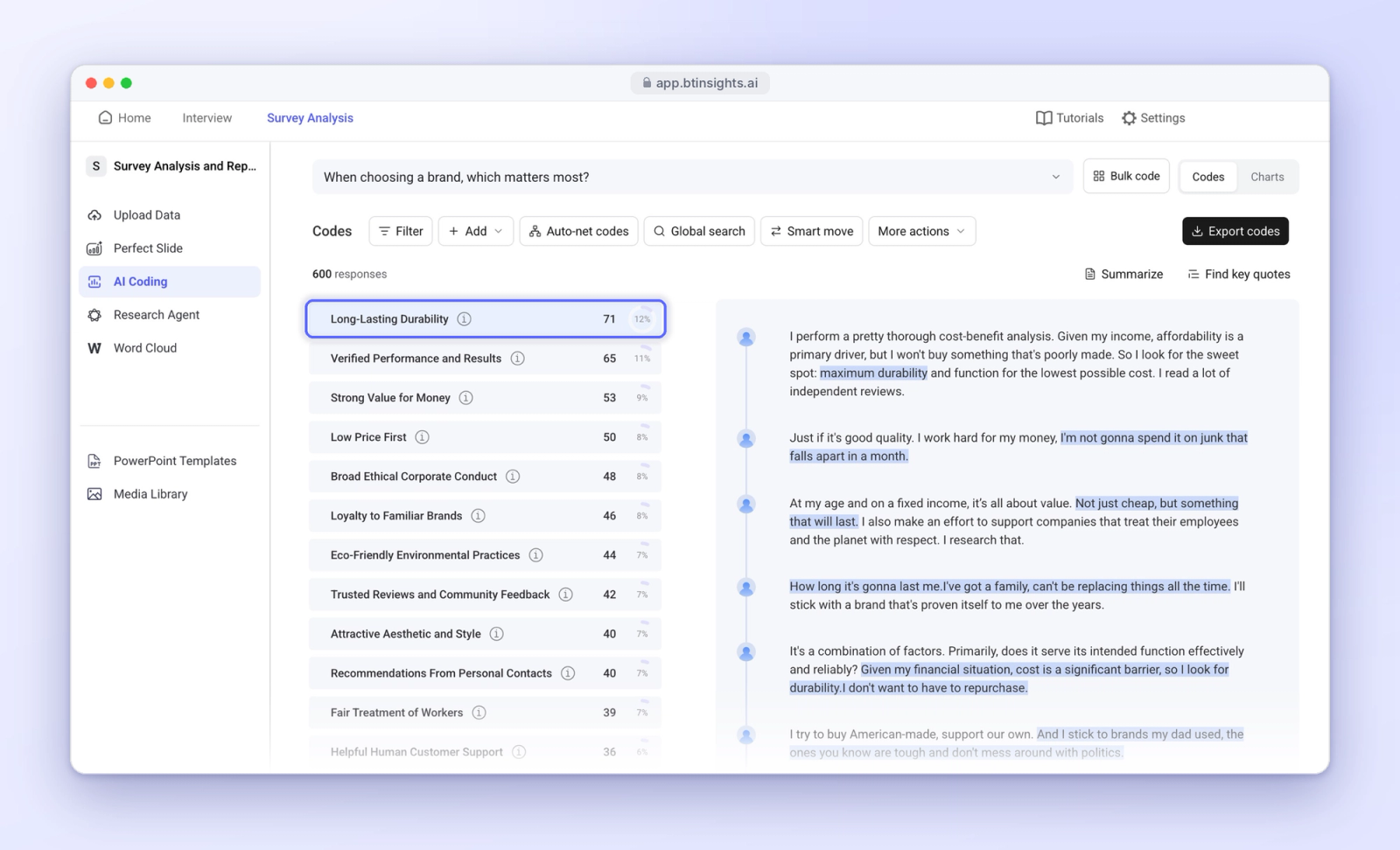
Open-ended coding (also called verbatim coding) is the process of assigning categories or labels to written survey responses.
Say your survey asks, "What would you improve about our product?" Potential codes might include:
- Price
- Product quality
- Customer support
- Ease of use
- Product features
Researchers can build a code frame in a few ways:
- Manually: Read a sample of responses and create categories by hand.
- With AI: Use verbatim coding software to generate a suggested code frame from the data.
- From an existing frame: Apply a code frame from a previous wave or a similar study, which keeps results consistent over time.
Some responses touch on more than one theme. A respondent who writes "It's too expensive, and the app keeps crashing" belongs under both price and product quality. This is called multi-coding, and good open-ended coding software handles it without extra steps.
Coding converts unstructured responses into categories you can count, compare, and analyze. It's the foundation for everything that follows.
What Is Cross-Tabulation in Survey Analysis?
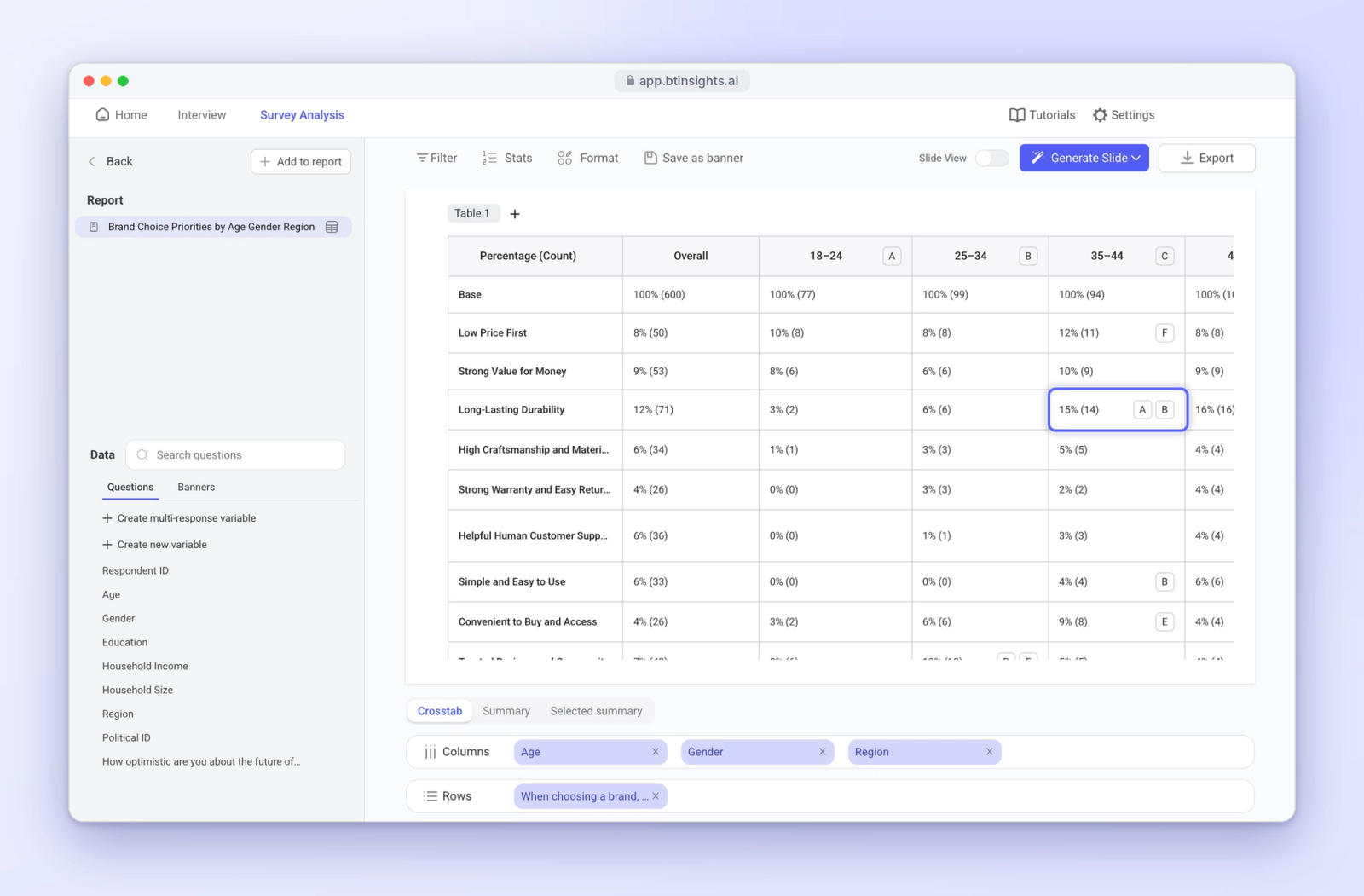
Cross-tabulation is a statistical analysis technique that compares responses across different groups or variables.
Once open-ended responses have been coded, those codes become variables you can cross-tab like any closed-ended question.
Imagine a customer survey that identifies three common reasons for dissatisfaction:
- Price
- Product quality
- Customer service
While overall frequencies might indicate that price is a top complaint, a cross-tab table takes things further. For example, it shows how often each reason appears among different age groups, geographic regions, or customer segments.
You might find that price dominates among younger customers, while older customers are far more likely to mention customer service. That tells a very different story from the overall numbers, and it points to different actions for each group.
Ultimately, coding frequencies tell you which themes are most common. Cross-tabulation tells you which groups are more or less likely to mention them.
Why Is Significance Testing Important?
Differences between respondent groups aren't always statistically meaningful. Some gaps appear purely because of sampling variation.
Significance testing helps you evaluate whether an observed difference is unlikely to be explained by sampling variation alone (subject to the assumptions of the test).
Go back to the earlier example. If younger customers mention price more often than older customers, a significance test can help you judge whether that gap provides evidence of a real pattern in the wider population.
Sample sizes, weighting and research design also affect how you should interpret results. A small base can produce a large percentage gap that doesn't hold up statistically. Most crosstab software flags significant differences with letters or symbols next to each figure, which makes these gaps easy to spot.
We can think about the three steps in this simple way:
- Coding reveals what respondents said.
- Cross-tabulation reveals which groups said it.
- Significance testing helps you evaluate the differences between those groups.
Why Traditional Open-Ended Survey Analysis Workflows Fall Short
Many survey analysis tools only support part of the market research workflow.
Some platforms specialize in open-ended coding. Others focus on statistical analysis or reporting. Very few connect all three.
As a result, research teams often move data between several applications before a single finding reaches a client or stakeholder.
The Traditional Survey Analysis Workflow
A typical project looks something like this:
- Step 1: Import open-ended survey responses into coding software.
- Step 2: Create a code frame and assign codes to responses.
- Step 3: Export the coded data into Excel, CSV, or another compatible format.
- Step 4: Import the results into separate crosstab software.
- Step 5: Build cross-tab tables and conduct significance testing.
- Step 6: Transfer the tables and findings into PowerPoint.
Each step works fine on its own. The trouble comes from the handoffs between them:
- Repeated exports and imports: Every transfer adds manual work and another chance for errors.
- Extra data preparation: Data formats and respondent identifiers may need cleanup before the coded data lines up with the rest of the survey file.
- Painful revisions: If you adjust the code frame, you have to export, re-import, and rebuild the tables all over again.
- Manual reporting: Tables and charts get recreated by hand in PowerPoint, which invites copy errors and inconsistent formatting.
- Slower turnaround: All these handoffs stretch the time between fieldwork closing and insights reaching decision-makers.
How BTInsights Connects Coding, Crosstabs and Reporting
BTInsights is a purpose-built platform for market researchers. It brings open-ended coding, cross-tabulation, statistical analysis, and PowerPoint reporting into one workflow.
Plenty of tools can code verbatims. Where BTInsights stands out is what you can do once the coding is complete.
Turn Coding Results Directly Into Cross-Tab Tables
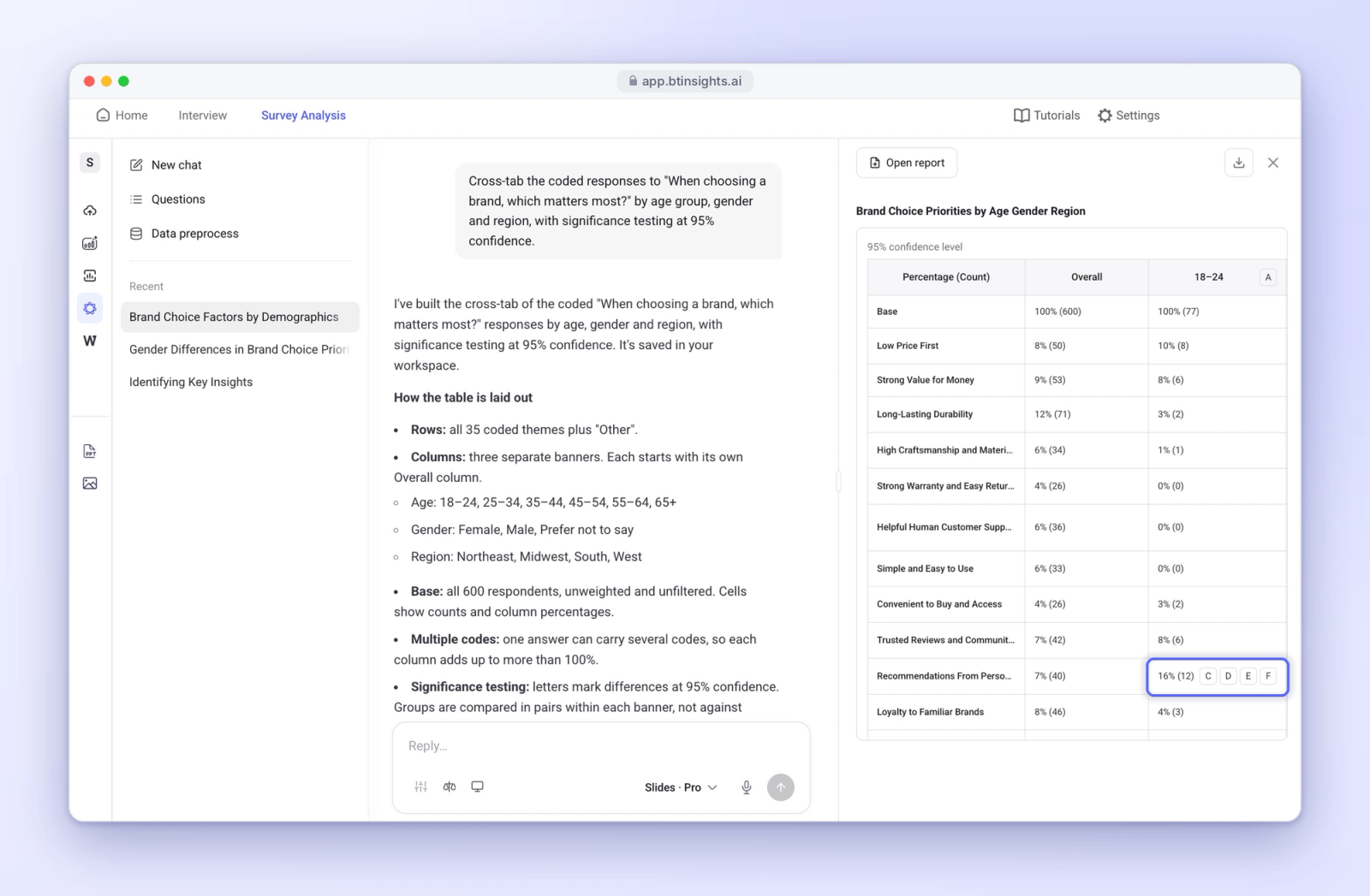
With BTInsights' proprietary cross-tabulation tool, you can turn open-ended coding results straight into cross-tab tables. There's no export to Excel, no reformatting, and no separate crosstab software to learn.
With your codes and respondent data in one place, you can start looking at how themes differ between age groups, regions, and customer segments. You can run statistical analyses there, too, without having to move your data elsewhere.
Generate Dozens of Cross-Tab Tables With the Research Agent
The BTInsights Research Agent can generate dozens of cross-tab tables in a single workflow. You describe the comparisons you need, and the agent builds them, so you skip the one-table-at-a-time grind.
That leaves more of your time for interpretation, which is where researchers add the most value.
Build PowerPoint Slides in Your Own Format
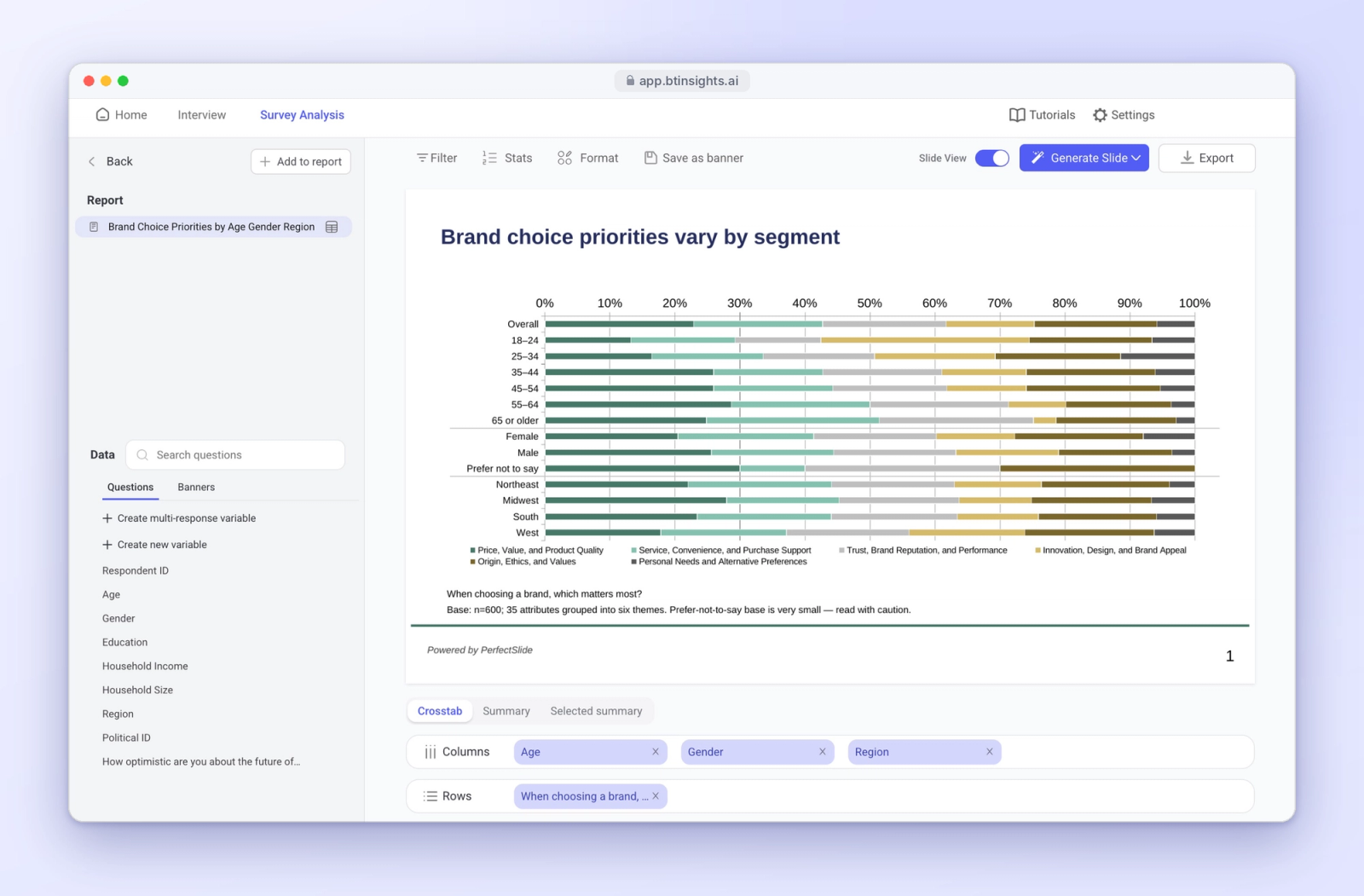
The Research Agent also helps you turn cross-tab results into PowerPoint slides that follow your own presentation formats.
Your templates and layouts stay intact, so the output is ready for review rather than a full rebuild. For agencies that deliver in-house style to clients, that's a big time saver.
Tips for Better Open-Ended Survey Analysis
Whatever tools you use, a few habits make open-ended data easier to work with:
- Plan your cross-tabs before you code: Know which segments matter so your code frame captures themes at the right level of detail.
- Keep code frames manageable: If your codes are too narrow, you may end up with too few responses in each category to make useful comparisons. Group similar codes together where appropriate.
- Check base sizes: Make sure each group has enough responses to support the comparisons you’re making.
- Review AI-generated codes: AI speeds up coding, but a researcher should still review the code frame and spot-check assignments.
- Pair numbers with verbatims: Back up cross-tab findings with a few representative quotes so stakeholders hear the customer's own words.
Wrapping Up
You get the most out of open-ended survey responses when coding, cross-tabulation, significance testing, and reporting all work together.
Coding helps you understand what people said, while cross-tabs show how responses differ between groups. Significance testing helps you determine which differences are statistically meaningful. From there, you can turn those findings into reports that decision-makers can put to use.
If your team still moves files between three or four tools on every project, a single workflow can save hours and cut errors. BTInsights takes you from coded verbatims to cross-tab tables to client-ready PowerPoint slides without the handoffs.
Ready to simplify your next survey project? Request a demo of BTInsights to see how coding, crosstabs, and reporting come together in one place.