
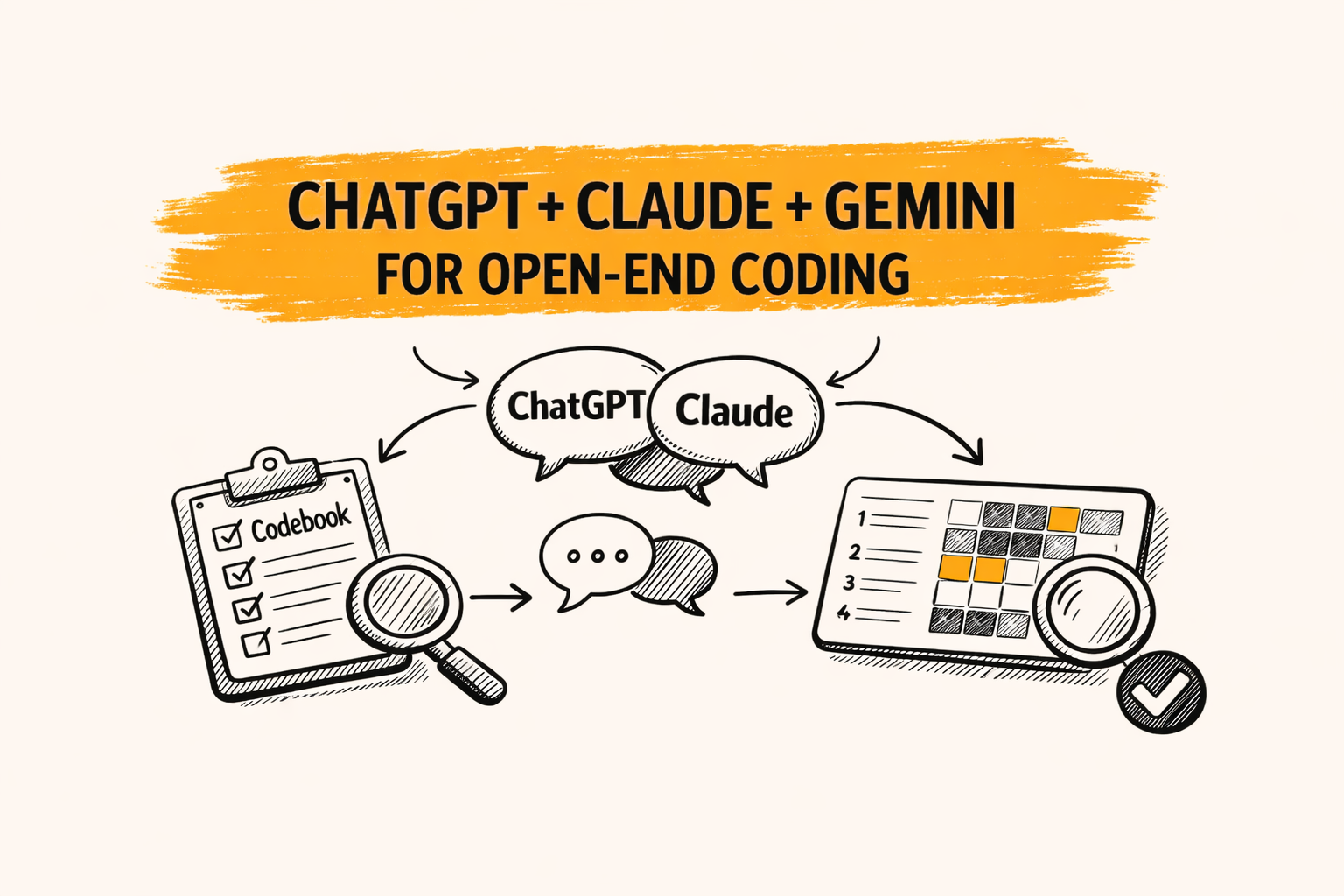
Open-end coding is the process of turning open-ended responses into structured themes, labels, and counts that can be reported. With ChatGPT, Claude, or Gemini, coding can move faster, but only if a clear method protects accuracy and consistency.
A practical takeaway: treat chatbots as a first-pass coder plus drafting assistant. Pair that with a codebook, a small pilot, and repeatable QA so results stay defensible when stakeholders ask, “How was this coded?”
Key takeaways
- Start with a codebook that includes rules, not just theme names.
- Code a small pilot first, then refine labels before scaling.
- Require quote evidence for every theme assignment.
- Validate with spot checks and a simple agreement check when possible.
What “open-end coding” means in market research
In market research, open-end coding turns messy text into structured outputs. Those outputs often include a codebook, coded rows, theme frequencies, and a short insight summary that explains what is driving the numbers.
This work sits between qualitative and quant. The themes come from thematic analysis, but the end goal is often quant-friendly reporting, like counts by segment, plus verbatims that explain “why.”
Open-end coding is not the same as software “coding.” Many online articles compare models for programming tasks. This guide focuses on coding text feedback, like NPS comments, onboarding surveys, and post-launch reviews.
Where ChatGPT, Claude, and Gemini fit, and where they fail
General chatbots are useful for speed and structure. They can draft a starter codebook, suggest theme names, and label obvious comments quickly. They also help rephrase insights into clear language for decks and reports.
The risks show up when the feedback is nuanced, mixed-topic, or sensitive. Chatbots can overgeneralize, miss edge cases, and drift in how they apply labels across batches. That drift is the main reason “one prompt” approaches fail.
A safer mindset is “assistive coding.” The model proposes codes, but the workflow forces consistency checks, clear rules, and human review. That keeps open-end coding reliable at scale.
A reliable workflow for open-end coding with chatbots
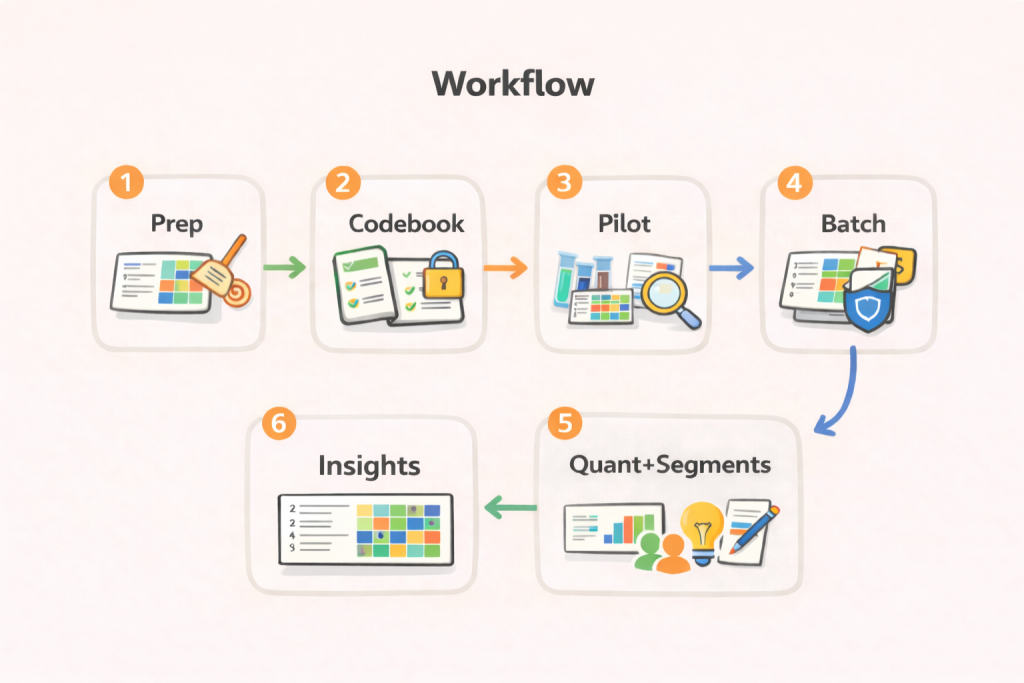
Step 1: Prepare the data and the decision question
Before prompting, define the decision the research must support. For example, “What should be fixed in onboarding?” is better than “Summarize feedback,” because it limits scope and reduces theme sprawl.
Next, clean the file. Remove duplicates, split multi-question verbatims into separate fields, and keep one response per row. Add segment columns early, like plan type, region, or tenure, so the coding can connect to cuts later.
Finally, pick a unit of coding. Some teams code a full response, others code sentence-level snippets. Sentence-level coding increases precision, but it also increases volume, so it needs stricter automation and sampling.
Step 2: Build a starter codebook, then lock definitions
A codebook is more than a list of themes. It should include definitions, inclusion rules, exclusion rules, and examples. That structure reduces “theme drift” when coding moves from 50 comments to 5,000.
A fast approach is “top-down plus bottom-up.” Start with a small set of expected buckets from the research goals, then let the model suggest new themes from a small sample. After review, freeze the codebook version.
Keep the codebook small at first. Many beginners create 30 to 60 themes immediately, then struggle to apply them consistently. A better start is 8 to 15 high-level themes, plus a plan to split large themes later.
Step 3: Run a pilot on 50 to 200 responses
Pilot coding is the reliability checkpoint. Select a diverse sample, including short, long, positive, negative, and mixed comments. Ask the model to apply the codebook, but also to flag comments that do not fit.
After the pilot, review three things: unclear definitions, duplicate themes, and missing themes. Update the codebook and rerun the same pilot to confirm the fixes improved consistency. This is faster than reworking a full dataset later.
If the study is high-stakes, add a second human coder for the pilot. Agreement can be assessed informally with a spot comparison, or more formally with intercoder metrics when the team has the setup.
Step 4: Scale coding in batches with consistency controls
Coding 10,000 verbatims in one run invites inconsistency, especially when prompts evolve. Batch the work, for example 300 to 1,000 rows at a time, and keep the prompt and codebook fixed for the whole project.
After each batch, sample 30 to 60 rows per major theme. Look for false positives, missed mixed-topic comments, and “catch-all” behavior. Update only the codebook notes, not the theme list, unless the problem is severe.
If a new theme truly emerges, add it, but tag it as “v2” and consider recoding earlier batches for that concept. Theme additions late in the process can distort counts if earlier rows never had the option.
Step 5: Quantify themes and connect them to segments
Once coding is stable, the themes can be counted by question and by segment. This is where open-end coding becomes decision-ready, because leaders can see what is driving issues for specific groups.
Cross-tab tables are a common format for these cuts. A crosstab is a table that shows the relationship between categorical variables, like “Theme by Region” or “Theme by Plan Type.”
For open ends, the crosstab usually shows theme frequencies or shares. It often pairs with two to four representative verbatims per cell, so the numbers stay grounded in what people actually said.
Step 6: Write insight statements, not theme summaries
A theme list is not an insight. An insight links a trend to a driver and then to an action. A practical pattern is: “What is happening,” “Who it affects,” “Why it is happening,” and “What to do next.”
For example, “confusing pricing” is a theme. An insight is: “Pricing confusion spikes for new users on annual plans, driven by unclear renewal messaging, suggesting a billing page rewrite and a pre-renewal email test.”
This is also where chatbots help again. They can draft insight statements and alternatives, but the workflow should still require quote evidence so the narrative matches the data.
AI survey open-ends analysis with exceptional accuracy
Let AI generate codes or use your own codebook
Prompt patterns that improve coding quality
Good prompts reduce ambiguity. They force structure, define boundaries, and ask for evidence. The goal is not creativity, it is repeatability, because coding is closer to measurement than writing.
Below are three prompt patterns that tend to work across ChatGPT, Claude, and Gemini. They can be adapted to the team’s preferred tool and export format.
Pattern 1: Codebook builder prompt
Use this when starting a study, or when the pilot reveals theme confusion.
Task: Build a starter codebook for open-end coding.
Input:
– Research goal: [paste]
– Question text: [paste]
– Sample responses (50–100): [paste]
Output format:
1) Theme name
2) Definition (1–2 sentences)
3) Include when
4) Exclude when
5) 2 example verbatims from the sample
6) Suggested subcodes (optional)
Rules:
– Keep 10–15 themes max.
– Use plain language theme names.
– Do not invent examples.
This prompt forces definitions and inclusion rules early. It also prevents the model from producing an unmanageable theme list, which is a common beginner mistake.
Pattern 2: Batch coding with evidence prompt
Use this for production coding, after the codebook is stable.
Task: Apply the attached codebook to the responses.
Inputs:
– Codebook: [paste]
– Responses (CSV-like rows): [paste 200–500 rows]
Output:
Return a table with columns:
row_id | primary_theme | secondary_theme (optional) | confidence (low/med/high) | evidence_quote
Rules:
– Choose only themes from the codebook.
– If no theme fits, use “Other” and explain why.
– evidence_quote must be an exact excerpt from the response.
The evidence quote requirement reduces vague assignments. It also makes review faster because the checker can verify the label without rereading the full response.
Pattern 3: Self-check and drift detection prompt
Use this after each batch to catch consistency issues.
Task: Audit this coded batch for theme drift.
Input:
– Codebook: [paste]
– 50 coded rows (row_id, theme, response): [paste]
Output:
1) 3 themes with the most inconsistent application
2) Why they are inconsistent (1–2 sentences each)
3) Proposed definition edits (do not rename themes)
4) 5 rows to recheck, with reason
This pattern makes the model play “QA partner” instead of “coder.” It can surface weak definitions and overlapping themes before the dataset gets too large.
Reliability and validation, in plain language
Open-end coding needs reliability because it turns text into numbers. If the same response could receive different codes on different days, the counts can become noise. That is why market research teams use codebooks, training, and checks.
Intercoder reliability is one way to evaluate consistency across coders. In content analysis, it is often described as the extent to which independent coders make the same coding decisions.
For teams that want a formal metric, Krippendorff’s alpha is a widely used reliability coefficient for coding tasks. It is designed to measure agreement among observers or coders when assigning values to data.
Many projects do not need a full statistics workflow. A lighter approach still helps: double-code 50 to 100 responses, compare disagreements, refine definitions, then proceed. The key is to do it early, before scaling.
How to scale open-end coding without losing trust
Scaling is mostly about consistency, not model choice. When volume rises, small definition gaps turn into large count errors. A scalable system keeps prompts stable, runs batch QA, and limits late theme changes.
For multilingual work, translate carefully. Some teams translate first, then code in one language. Others code in the source language. Either way, the workflow should keep original verbatims available so reviewers can validate meaning.
For niche or technical industries, give the model context. Provide a short glossary and a few “gold standard” coded examples. Without that, the model may misread jargon and map it to the wrong theme.
For sensitive topics, reduce exposure. Remove names and identifiers before uploading text into any tool. Keep a clear data handling policy, especially when responses could include health, legal, or HR details.
Common pitfalls and how to fix them
One pitfall is “theme soup.” That happens when themes mix drivers, topics, and emotions in the same layer. The fix is to separate “topic” themes from “reason” subcodes, or to keep one clear dimension per codebook.
Another pitfall is “Other” becoming the biggest bucket. That usually means definitions are too narrow or theme overlap is high. Review 30 “Other” responses, then decide whether to broaden a theme or add one new theme.
A third pitfall is over-trusting confidence scores. Models often output “high confidence” even when the assignment is questionable. Evidence quotes and spot checks are more reliable than confidence labels.
Best Tool for Survey Text Analysis
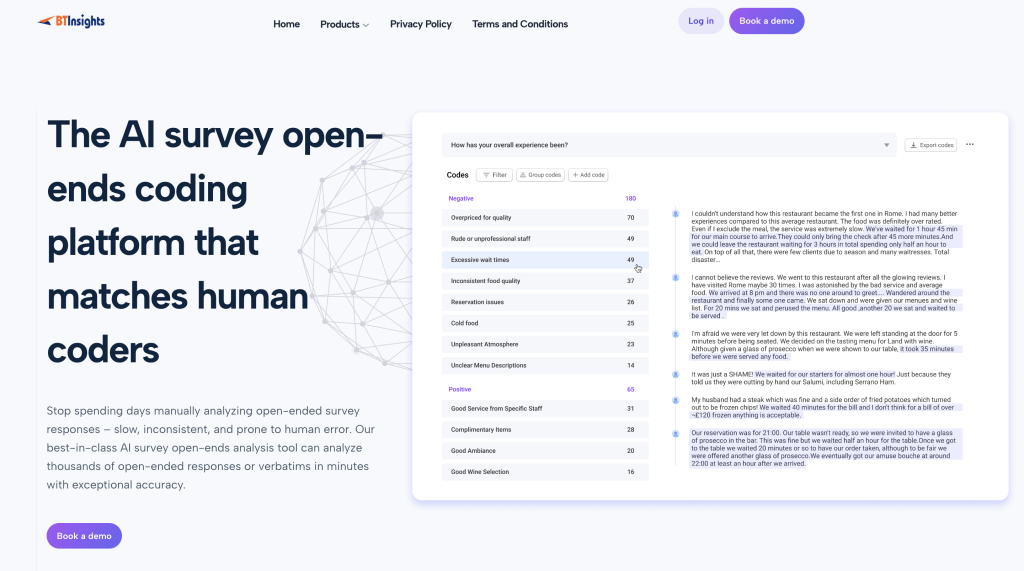
Some teams move from general chatbots to purpose-built survey text analysis tools when volume, QA, and reporting needs grow. BTInsights positions its Survey Text Analysis workflow around accuracy that matches human coders, human-in-the-loop review and editing, multi-language support for 50+ languages.
It also highlights workflows that let AI generate your codes or use your own codebook, including entity coding. Those kinds of setups are often designed to reduce hallucinations by linking insights back to source quotes and transcripts, with a goal of no AI hallucinations in reporting.
AI survey open-ends analysis with exceptional accuracy
Let AI generate codes or use your own codebook
Two short examples, from raw verbatims to actions
Example 1: SaaS onboarding survey open ends
Scenario: a SaaS team has 2,400 open-ended responses to “What was hardest about setup?” Segments include role, company size, and plan type.
The pilot produces 12 themes, including “API confusion,” “permissions,” and “billing setup.” After review, “API confusion” is split into “docs clarity” and “auth tokens” because those lead to different fixes.
The final output includes a theme frequency table, plus cuts by plan type. The insight: “Auth token confusion is concentrated in self-serve annual plans,” paired with verbatims and a recommended docs update and in-app tooltip test.
Example 2: NPS verbatims after a pricing change
Scenario: an NPS survey includes “Why did you give that score?” with 8,000 responses. Leadership wants to know if the pricing change is the driver, and for which customers.
The codebook separates “topic” from “sentiment.” Topics include “price level,” “billing clarity,” “value perception,” and “support.” The “billing clarity” topic is defined to include renewal surprises and invoice confusion, not general price complaints.
A crosstab shows “billing clarity” spikes among customers with less than 90 days tenure. That points to onboarding and messaging fixes, not just pricing strategy. Verbatims supply the language for a revised renewal message.
A simple checklist before publishing results
Before a deck goes out, a few checks keep the work credible.
- Confirm the codebook version used for every batch.
- Spot check at least 30 rows per top theme.
- Verify every headline insight has 2–4 supporting verbatims.
- Recompute counts after any theme change, even a small one.
- Document edge cases and how they were handled.
These steps make open-end coding easier to defend. They also make future waves comparable, because the logic stays visible and repeatable.
FAQ
Can ChatGPT, Claude, or Gemini replace human coders?
They can accelerate first-pass coding and drafting, but human review is still needed for edge cases, nuanced themes, and consistent application of definitions across segments.
What is the minimum dataset size where a codebook is worth it?
A codebook helps even at 100 responses if results will be quantified or compared across groups. It becomes essential once the work must be repeatable or shared across analysts.
How many themes should be in a beginner codebook?
A common starting range is 8 to 15 themes. More themes can be added later, but early over-splitting often reduces consistency.
How can results be validated without advanced statistics?
Double-code a small sample, compare disagreements, refine definitions, then spot check the top themes in every batch. Evidence quotes make review faster and clearer.
What is the difference between themes and insights?
Themes label what people talked about. Insights explain what is changing, who it affects, why it matters, and what action should follow, backed by counts and verbatims.
Do cross-tab tables matter for open-end coding?
Yes, when stakeholders need to see which segments over-index on a theme. Crosstabs connect qualitative themes to quant structure in a decision-ready format. If cross-tab tables is critical for your project, make sure to use platforms such as BTInsights that includes the ability to create cross-tab tables based on the coding results.
AI survey open-ends analysis with exceptional accuracy
Let AI generate codes or use your own codebook